


Messages: SMS, Messenger Home
3.7294.00 Reviews
App Specs
- Version
- 2.4.11
- Updated On
- License
- Free
- Downloads
- 1,000,000+
- Developer
- Apps Specials
- Categories
- Communication
- Platform
- Android
Screenshots
 Analysis by AppCompare
I judge a messaging app by how quickly I can read a thread, find an old detail, and get back to whatever I was doing. Messages: SMS, Messenger Home is aimed at people who want their SMS conversations close at hand rather than spread across a busy phone interface. Its focus on a clean home screen and spam control gives it a practical appeal, though the launcher angle may not suit everyone. For me, its strongest case is making everyday texting feel more direct; its weakest is that useful convenience can come with a change to how the phone’s home screen works.
Who will find it useful
This is a communication app from Apps Specials, and it is free to install. It has an average rating of around 3.7 from roughly 6,600 ratings, with more than a million installs. That suggests it has found an audience, but the rating also encourages a measured expectation: I would try it for its particular approach to messaging, not assume that every part of the experience will fit my habits.
I can see it suiting someone who mostly texts and wants conversations easy to reach, especially if opening a separate app and searching through a crowded phone feels like needless friction. The home-screen emphasis is also relevant for anyone who checks messages in short bursts during the day. If you mainly communicate through a particular internet-based chat service, though, your existing app may remain the better home for those conversations.
Your Messaging Hub
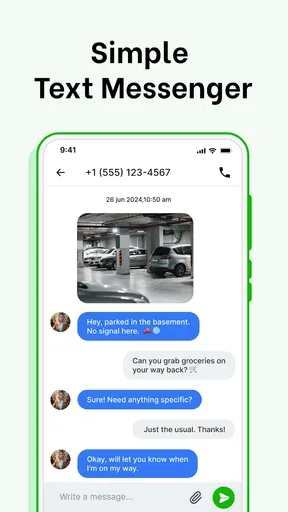
At first glance, Messages: SMS, Messenger Home is designed to be intuitive and user-friendly. The app integrates SMS, MMS, and instant messaging into a single platform, providing a seamless experience for users who want to streamline their communication. I found the interface refreshingly simple, with a clean design that makes navigation a breeze.
Readability and navigation
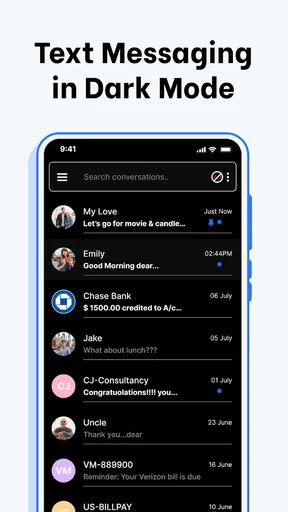
A clean interface matters most when I am scanning quickly, not when I have time to explore every setting. The app’s stated emphasis on a tidy home screen and straightforward message access points toward a layout intended to keep conversations visible. That can help when I need to spot a recent exchange without mentally sorting through unrelated app icons or notifications.
Search is useful for a different kind of task: retrieving a detail after the conversation has moved on. If I am trying to find an address, an appointment time, or the name of a person someone mentioned, searching a thread can be faster than scrolling back message by message. I would still treat search as a retrieval aid rather than a substitute for organizing important information elsewhere; a text thread is not a dependable calendar or notes system.
Features That Stand Out
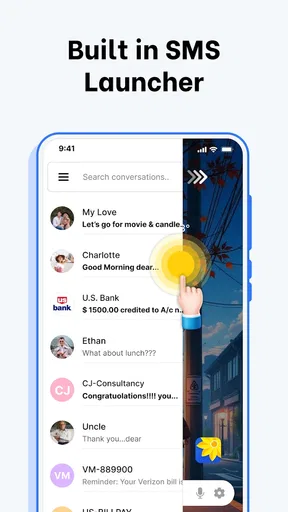
One of the standout features is the customizable home screen. You can set the app as your default launcher, which means your most recent messages are always front and center. It's like having a personal assistant who keeps all your chats organized without you having to lift a finger.
Worth Reading Before You Choose

EA SPORTS FC Mobile 26 Is a Bigger Football Game, but It Takes Time

Flipboard Shows What News Apps Must Do Beyond the Feed

Switching to Android Auto Means Rethinking Your Driving Routine

Google Calendar Makes a Crowded Week Easier to Manage

Ludo King Makes the Most of the Minutes Between Plans

Baby Panda World Brings Quick Play to Modern Phones, but Its Game Library Feels Busy
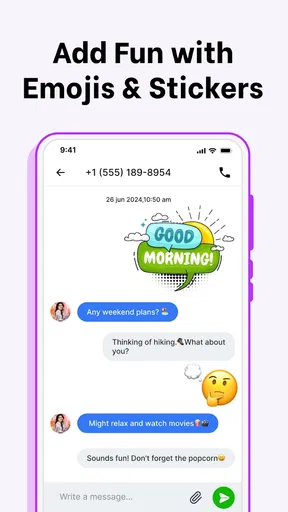
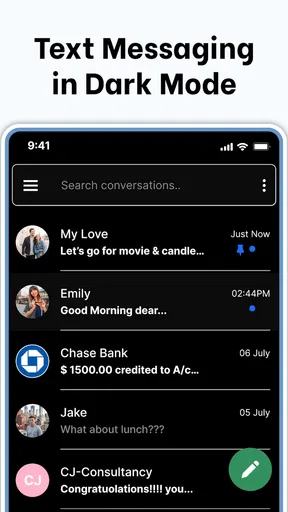
The app also supports rich media messages. You can send and receive images, videos, and even audio files without any hassle. And for those who love personalization, there are plenty of themes and wallpapers to choose from. It’s like giving your phone a mini makeover every day.
Making the home screen work for you
Before making a launcher-style change, I would think about what I actually need to see first when I unlock my phone. If conversations are a daily priority, keeping messages prominent may save a few taps. If I rely on a carefully arranged home screen for work, accessibility tools, or quick access to other apps, changing that starting point could cost more time than it saves.
A useful way to assess the trade-off is to consider a normal day rather than a one-time setup. Imagine receiving a delivery update while cooking, then needing to reply to a family member while heading out. Fast access can help in those brief moments, but only if the home screen remains predictable enough that I can reach the other tools I use without hunting. I would make the layout change only if the messaging benefit is worth reshaping that routine.
Motor and sensory considerations
For someone who prefers fewer navigation steps, placing conversations closer to the starting screen may be helpful. Themes and wallpapers also allow some visual personalization, though personalization is not the same as a dedicated accessibility control. I would choose a calm, legible-looking appearance over a decorative one if busy backgrounds make it harder to focus on message text.
There is a practical trade-off for motor needs as well. A home screen centered on messages may reduce the need to open and leave a separate app, but changing the launcher can also alter familiar navigation habits. Anyone who depends on consistent placement and repeated routines should take time to see whether the new arrangement feels easier or makes reaching other apps less automatic.
For sensory comfort, I would also consider when and where I usually read messages. A bright or visually busy theme might be pleasant in a quick glance but distracting during longer exchanges. I would keep customization restrained if contrast, visual clutter, or rapidly shifting attention is a concern, and use the phone’s own display settings where those better fit my needs.
Security and Privacy
In today's digital age, security is a big deal. Fortunately, Messages: SMS, Messenger Home takes privacy seriously. Your messages are encrypted, ensuring that your private conversations stay just that—private. Plus, with spam-blocking features, you can keep unwanted messages at bay.
Spam control is particularly useful for people whose inbox is interrupted by unfamiliar senders. It can help make a message list feel less noisy, but I would still read unexpected messages carefully and avoid treating a filtering feature as a guarantee that every suspicious text will be caught. When a message asks for sensitive details or urges an immediate action, it is safer to verify the request through a known contact method.
Text messages can also contain personal information, so I would avoid sending anything through SMS that I would not want exposed if a device or account were accessed by someone else. The app’s privacy claims may sound reassuring, but sensible habits still matter: use a secure device lock, be selective about what you share, and think twice before forwarding private media.
Situational access in an ordinary day
Picture a busy morning: I am leaving home, a relative texts a change of plans, and a delivery message arrives while I am checking the time. Having messages near the home screen could make it easier to see the relevant thread and answer without opening several unrelated apps. The benefit is not that texting becomes a replacement for every communication tool; it is that a familiar SMS task may take less navigation in a short, distracting moment.
That same setup may be less helpful in a meeting, a quiet waiting room, or a place where looking at the phone is inconvenient. Quick access does not mean every alert needs an immediate response. I would use the app as a way to reach conversations when it suits the situation, rather than letting a prominent message view encourage constant checking.
Performance and Usability
I found the app to be responsive and smooth, even with multiple threads open. The search function is robust, allowing you to quickly find past conversations or specific messages. However, what truly impressed me was the app’s ability to sync across devices. Whether you’re on a tablet or a smartphone, your messages are always up-to-date.
When choosing between a dedicated SMS app and the usual messaging alternatives, the key difference is the job I want the app to do. A standard SMS inbox is a simpler choice if I only want to send and receive texts in a familiar layout. A dedicated internet messaging service is often a better fit when my contacts already use it for group conversations and shared media. This app’s appeal is its home-screen orientation and message access, so I would not switch expecting it to replace every service my friends use.
Compatibility and Integration
The app is available for both Android and iOS, making it accessible to a wide range of users. It integrates well with other apps, allowing for easy sharing of content. Need to send a quick location pin or a calendar invite? No problem, Messages: SMS, Messenger Home has got you covered.
Installation is straightforward. Simply download it from the app store, and you'll be guided through a quick setup process. Within minutes, you’ll be texting like a pro.
It is marked for Everyone and was released on July 11, 2024. The current version is 2.4.11, and it requires Android 10 or later. Those details matter if I am checking whether an older phone can run it; before switching my main texting routine, I would also confirm that the version offered for my device matches the platform I use.
When another approach is better
I would skip the launcher-focused experience if I am happy with my current home screen and rarely need messages at a glance. A separate SMS app with a conventional inbox may be less disruptive for someone who wants to change only the way texts are handled, not the overall phone layout. Likewise, people whose conversations mostly happen in other services may get more value from improving access to those services instead.
There is also a small financial detail to keep in mind: the app is free, while optional in-app purchases range from about $7.49 to $32.99 per item. I would start with the free experience and only consider a purchase if I understand what it adds and expect to use it. A paid extra is not automatically worthwhile just because it is available, especially if my main need is basic access to messages.
Room for Improvement
While the app is impressive, it’s not without its quirks. Occasionally, there might be a slight delay in message delivery, especially when dealing with multimedia files. Also, while the customization options are great, they can be a bit overwhelming for someone who prefers a more minimalistic approach.
Another point to consider is that setting it as the default launcher might not be everyone’s cup of tea. If you’re someone who likes to keep their home screen clutter-free, this feature might feel a bit intrusive.
Remaining barriers and practical checks
Before relying on any new messaging app for time-sensitive conversations, I would test it with ordinary, low-stakes exchanges first. Send a text, reply to an existing thread, and try a picture message if that is part of my routine. This gives me a chance to notice any delay or unexpected change before I depend on it for a last-minute pickup or an important update.
I would also check which app is set to handle SMS after setup and make sure the arrangement behaves as expected. With a launcher-style option, there are two separate questions: whether messages are easy to reach and whether the rest of the phone still feels comfortable to navigate. Testing both is more useful than judging the app from its first screen alone.
For someone who needs a highly predictable interface, the choice of themes and the possibility of a changed home screen may require extra adjustment. For someone who benefits from a stable, uncluttered layout, keeping customization simple and avoiding a full launcher change may be the more comfortable path. The app can make messages more visible, but the best setup depends on the person and their phone habits.
Final Thoughts
Overall, Messages: SMS, Messenger Home is a solid choice for anyone looking to consolidate their messaging apps. It offers a user-friendly interface, robust security features, and seamless integration with other apps. While it has a few areas that could use a bit of polish, it’s a reliable app that does exactly what it promises. If you’re tired of flipping between different messaging platforms, give this app a shot—you might just find it’s exactly what you’ve been looking for.
So, are you ready to simplify your messaging experience? Head over to the app store and download Messages: SMS, Messenger Home today. Happy texting!
My inclusive verdict is that this is most appealing when quick access to SMS is a real daily need and the home-screen approach feels comfortable rather than imposed. I would recommend trying it cautiously, keeping the layout simple at first, and checking message behavior before making it part of an important routine. If changing the launcher would disrupt a familiar setup, or if most of your conversations already live elsewhere, a conventional messaging app is likely the better fit.
Pros
- User-friendly interface with intuitive navigation.
- Customizable themes for personalized experience.
- Low data consumption for efficient messaging.
- Supports multimedia sharing like photos and videos.
- Quick setup and easy integration with contacts.
Cons
- Lacks advanced privacy features for security.
- Limited support for third-party integrations.
- Occasional ads can disrupt the user experience.
- No option for encrypted messaging.
- Limited customization for notification settings.
FAQs for Messages: SMS, Messenger Home
What features does Messages: SMS, Messenger Home offer?
Messages: SMS, Messenger Home provides a streamlined messaging experience with features like customizable themes, quick reply options, and a user-friendly interface. It supports SMS and MMS, allowing you to send text, images, and videos effortlessly. Additionally, the app integrates with your contacts for easy messaging and offers spam protection to keep your inbox clean.
Is Messages: SMS, Messenger Home free to use?
Yes, Messages: SMS, Messenger Home is free to download and use. However, it might offer in-app purchases or display ads to support the developers. These purchases typically provide additional features or remove ads, enhancing the overall user experience. Be sure to check the app’s store listing for detailed pricing information.
How secure is Messages: SMS, Messenger Home for my privacy?
Messages: SMS, Messenger Home prioritizes user privacy by implementing standard encryption protocols for SMS and MMS. While it doesn’t offer end-to-end encryption like some messaging apps, it does protect your data from unauthorized access. Always ensure you download the app from a reputable source to avoid security risks.
Can I customize the appearance of Messages: SMS, Messenger Home?
Absolutely! Messages: SMS, Messenger Home offers a variety of customization options. Users can change themes, alter text sizes, and personalize notifications to match their preferences. This degree of customization allows for a tailored messaging experience that can suit individual styles and needs.
Does Messages: SMS, Messenger Home require a constant internet connection?
Messages: SMS, Messenger Home primarily uses SMS and MMS, which operate through your mobile network. Therefore, it does not require a constant internet connection for sending and receiving standard texts. However, certain features, like media downloads or updates, may need internet access to function optimally.


